Changelist Row Attributes
Important
In order for this feature to work, the user browser must support html template tags.
With Baton you can add every kind of html attribute (including css classes) to any element in the changelist table (cell, rows, …)
It’s a bit tricky, let’s see how:
Add a
baton_cl_rows_attributesfunction to yourModelAdminclass, which takesrequestandcl(changelist view) as parameters.Return a json dictionary where the keys are used to match an element and the values specifies the attributes and other rules to select the element.
Better to see an example:
class NewsModelAdmin(admin.ModelAdmin):
    # ...

    def get_category(self, instance):
        return mark_safe('<span class="span-category-id-%d">%s</span>' % (instance.id, str(instance.category)))
    get_category.short_description = 'category'

    def baton_cl_rows_attributes(self, request, cl):
        data = {}
        for news in cl.queryset.filter(category__id=2):
            data[news.id] = {
                'class': 'table-info',
            }
        data[news.id] = {
            'class': 'table-success',
            'data-lol': 'lol',
            'title': 'A fantasctic tooltip!',
            'selector': '.span-category-id-%d' % 1,
            'getParent': 'td',
        }
        return json.dumps(data)
In such case we’re returning a dictionary with possibly many keys (each key is an id of a news instance).
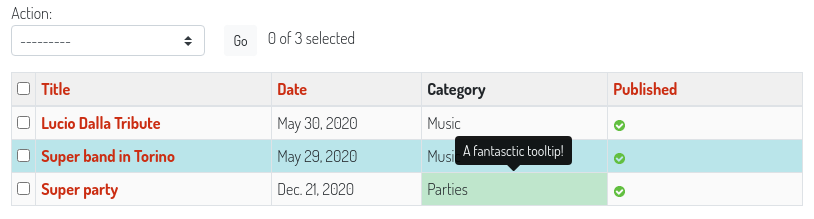
The first kind of dictionary elements will add a table-info class to the tr (rows) containing the news respecting the rule category__id=2
The second kind of element instead uses some more options to customize the element selection: you can specify a css selector, and you can specify if Baton should then take one of its parents, and in such case you can give a parent selector also.
In the example provided Baton will add the class table-success, data-attribute and the title attribute to the cell which contains the element .span-category-id-1.
So these are the rules:
the default
selectoris#result_list tr input[name=_selected_action][value=' + key + '], meaning that it can work only if the model is editable (you have the checkox inputs for selecting a row), and selects the row of the instance identified bykey. If you use a custom selector the dictionarykeyis unuseful.the default
getParentistr. You can change it at you will, or set it to False, in such case the element to which apply the given attributes will be the one specified byselector.Every other key different from
selectorandgetParentwill be considered an attribute and added to the element.