Customization
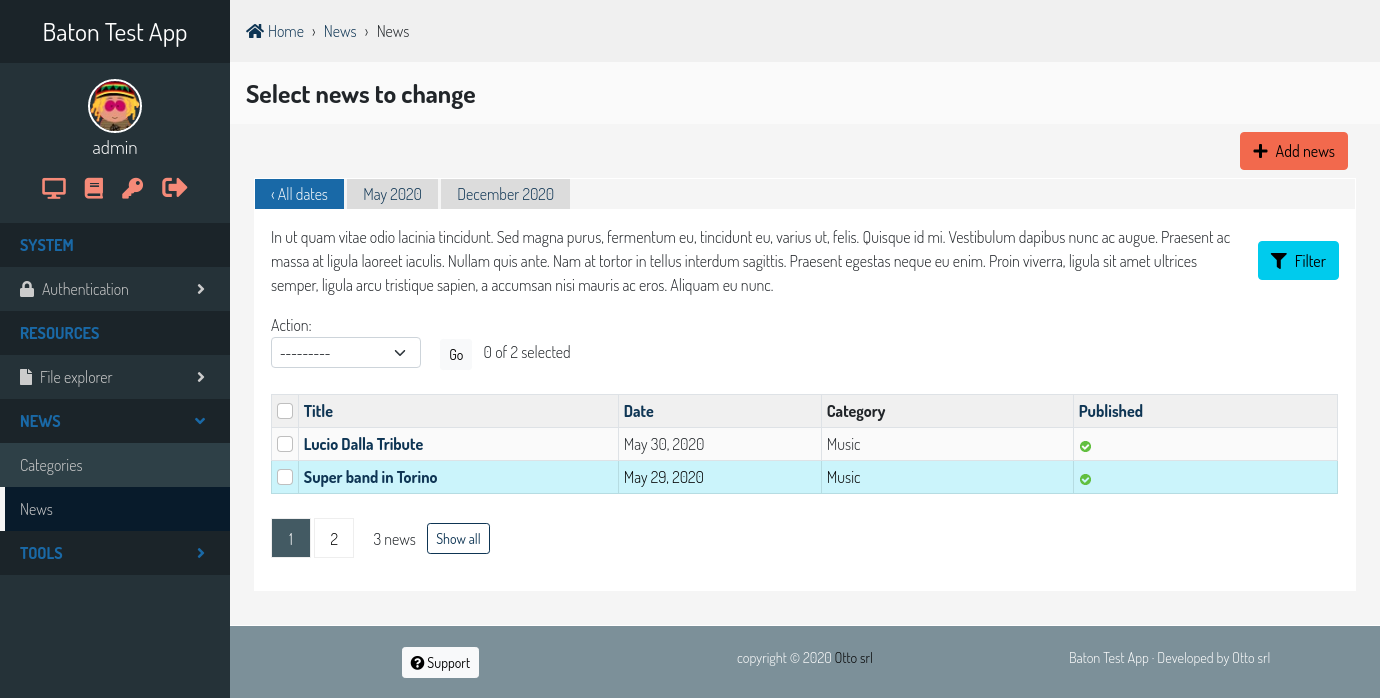
It’s easy to customize the appeareance of baton.
You can override all the css variables, just create a baton/css/root.css file and serve it from an app listed before baton in INSTALLED_APPS.
You can also create themes directly from the admin site, just surf to /admin/baton/batontheme/. There can be only one active theme, if present, the saved content is used instead of the root.css file. So just copy the content of that file in the field and change the colors you want. Be aware that the theme content is considered safe and injected into the page as is, so be carefull.
Important
You can find ready to use themes and new ideas at otto-torino/django-baton-themes
If you need heavy customization or you need to customize the primary and secondary colors, you can edit and recompile the JS app which resides in baton/static/baton/app.
The Baton js app
The js app which baton provides is a modern js app, written using es2015 and stage-0 code features, which are then transpiled to a code browsers can understand using babel and webpack.
All css are written using sass on top of bootstrap, and transpiled with babel so that the final output is a single js file ready to be included in the html template.
The app entry point is index.js, where the only variable attached to the window object Baton is defined.
All the js modules used are inside the core directory.
Change the baton appearance
It’s quite easy to change completely the appearance of baton, just make the changes you like and recompile the app. Then make sure to serve your recompiled app in place of the baton one.
Here comes what you have to do:
place one of your django apps before baton in the INSTALLED_APPS settings, I’ll call this app ROOTAPP
clone the repository (or copy the static/baton/app dir from your virtualenv)
$ git clone https://github.com/otto-torino/django-baton.git
install the app requirements
$ cd django-baton/baton/static/baton/app/
$ npm install
edit the
src/styles/_variables.scssfile as you likerecompile the app
$ npm run compile
copy the generated bundle
dist/baton.min.jsinROOTAPP/static/baton/app/dist/
You can also perform live development, in this case:
place one of your django apps before baton in the INSTALLED_APPS settings, I’ll call this app ROOTAPP
create an admin base_site template
ROOTAPP/templates/admin/base_site.htmlwith the following content:{% extends "admin/base.html" %} {% load static baton_tags %} {% load i18n %} {% block title %}{% if subtitle %}{{ subtitle }} | {% endif %}{{ title }} | {{ site_title|default:_('Django site admin') }}{% endblock title %} {% block extrahead %} {% baton_config as conf %} {{ conf | json_script:"baton-config" }} <script charset="utf-8"> (function () { // immediately set the theme mode to avoid flashes var systemTheme = window.matchMedia("(prefers-color-scheme: dark)"); var theme = JSON.parse(document.getElementById('baton-config').textContent).forceTheme || localStorage.getItem('baton-theme') || (systemTheme.matches ? 'dark' : 'light'); document.getElementsByTagName('html')[0].setAttribute('data-bs-theme', theme); })() </script> <meta content="width=device-width, initial-scale=1.0" name="viewport" /> <script src="{% static 'baton/app/dist/baton.min.js' %}"></script> <!-- <script src="http://localhost:8080/static/baton/app/dist/baton.min.js"></script> --> <script src="{% static 'baton/js_snippets/init_baton.js' %}"></script> {% baton_theme %} {% endblock extrahead %} {% block branding %} <div class="baton-startup-overlay"></div> <h1 id="site-name"><a href="{% url 'admin:index' %}">{{ site_header|default:_('Django administration') }}</a></h1> {% endblock branding %} {% block nav-global %}{% endblock nav-global %} {% block footer %} {% footer %} {% endblock footer %}or you can edit directly the baton template and switch the comment of the two lines:
<!-- <script src="{% static 'baton/app/dist/baton.min.js' %}"></script> comment the compiled src and uncomment the webpack served src -->
<script src="http://localhost:8080/static/baton/app/dist/baton.min.js"></script>
start the webpack development server
$ npm run dev:baton
Now while you make your changes to the js app (css included), webpack will update the bundle automatically, so just refresh the page and you’ll see your changes.