Configuration
You can configure your baton installation defining a config dictionary in your settings.py
Example
This is an example of configuration:
from baton.ai import AIModels

BATON = {
    'SITE_HEADER': 'Baton',
    'SITE_TITLE': 'Baton',
    'INDEX_TITLE': 'Site administration',
    'SUPPORT_HREF': 'https://github.com/otto-torino/django-baton/issues',
    'COPYRIGHT': 'copyright © 2017 <a href="https://www.otto.to.it">Otto srl</a>', # noqa
    'POWERED_BY': '<a href="https://www.otto.to.it">Otto srl</a>',
    'CONFIRM_UNSAVED_CHANGES': True,
    'SHOW_MULTIPART_UPLOADING': True,
    'ENABLE_IMAGES_PREVIEW': True,
    'CHANGELIST_FILTERS_IN_MODAL': True,
    'CHANGELIST_FILTERS_ALWAYS_OPEN': False,
    'CHANGELIST_FILTERS_FORM': True,
    'CHANGEFORM_FIXED_SUBMIT_ROW': True,
    'COLLAPSABLE_USER_AREA': False,
    'MENU_ALWAYS_COLLAPSED': False,
    'MENU_TITLE': 'Menu',
    'MESSAGES_TOASTS': False,
    'GRAVATAR_DEFAULT_IMG': 'retro',
    'GRAVATAR_ENABLED': True,
    'FORCE_THEME': None
    'LOGIN_SPLASH': '/static/core/img/login-splash.png',
    'SEARCH_FIELD': {
        'label': 'Search contents...',
        'url': '/search/',
    },
    'BATON_CLIENT_ID': 'xxxxxxxxxxxxxxxxxxxx',
    'BATON_CLIENT_SECRET': 'xxxxxxxxxxxxxxxxxx',
    'IMAGE_PREVIEW_WIDTH': 200,
    'AI': {
        'MODELS': "myapp.foo.bar", # alternative to the below for lines, a function which returns the models dictionary
        'IMAGES_MODEL': AIModels.BATON_DALL_E_3,
        'VISION_MODEL': AIModels.BATON_GPT_4O_MINI,
        'SUMMARIZATIONS_MODEL': AIModels.BATON_GPT_4O_MINI,
        'TRANSLATIONS_MODEL': AIModels.BATON_GPT_4O,
        'ENABLE_TRANSLATIONS': True,
        'ENABLE_CORRECTIONS': True,
        'CORRECTION_SELECTORS': ["textarea", "input[type=text]:not(.vDateField):not([name=username]):not([name*=subject_location])"],
        'CORRECTIONS_MODEL': AIModels.BATON_GPT_3_5_TURBO,
    },
    'MENU': (
        { 'type': 'title', 'label': 'main', 'apps': ('auth', ) },
        {
            'type': 'app',
            'name': 'auth',
            'label': 'Authentication',
            'icon': 'fa fa-lock',
            'default_open': True,
            'models': (
                {
                    'name': 'user',
                    'label': 'Users'
                },
                {
                    'name': 'group',
                    'label': 'Groups'
                },
            )
        },
        { 'type': 'title', 'label': 'Contents', 'apps': ('flatpages', ) },
        { 'type': 'model', 'label': 'Pages', 'name': 'flatpage', 'app': 'flatpages' },
        { 'type': 'free', 'label': 'Custom Link', 'url': 'http://www.google.it', 'perms': ('flatpages.add_flatpage', 'auth.change_user') },
        { 'type': 'free', 'label': 'My parent voice', 'children': [
            { 'type': 'model', 'label': 'A Model', 'name': 'mymodelname', 'app': 'myapp', 'icon': 'fa fa-gavel' },
            { 'type': 'free', 'label': 'Another custom link', 'url': 'http://www.google.it' },
        ] },
    )
}
Site header
Default: baton logo
Important
SITE_HEADER is marked as safe, so you can include img tags or links
Site title
Default: ‘Baton’
Index title
Default: ‘Site administration’
Support href
This is the content of the href attribute of the support link rendered in the footer.
Default: ‘https://github.com/otto-torino/django-baton/issues’
Example: ‘mailto:support@company.org’
Copyright
A copyright string inserted centered in the footer
Default: ‘copyright © 2017 <a href=”https://www.otto.to.it”>Otto srl</a>’
Important
COPYRIGHT is marked as safe, so you can include img tags or links
Powered by
A powered by information included in the right part of the footer, under the SITE_TITLE string
Default: ‘<a href=”https://www.otto.to.it”>Otto srl</a>’
Important
POWERED_BY is marked as safe, so you can include img tags or links
Confirm unsaved changes
Alert the user when he’s leaving a change or add form page without saving changes
Default: True
Important
The check for a dirty form relies on the jQuery serialize method, so it’s not 100% safe. Disabled inputs, particular widgets (ckeditor) can not be detected.
Show multipart uploading
Show an overlay with a spinner when a multipart/form-data form is submitted
Default: True
Enable images preview
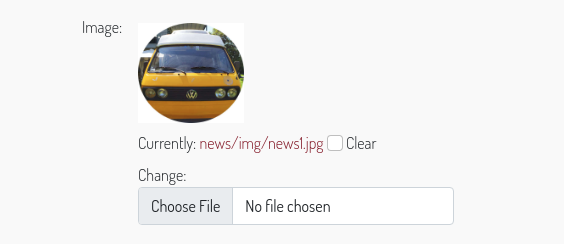
Displays a preview above all input file fields which contain images. You can control how the preview is displayed overriding the class .baton-image-preview. By default previews are 100px height and with a box shadow on over event
Default: True
Changelist filters in modal
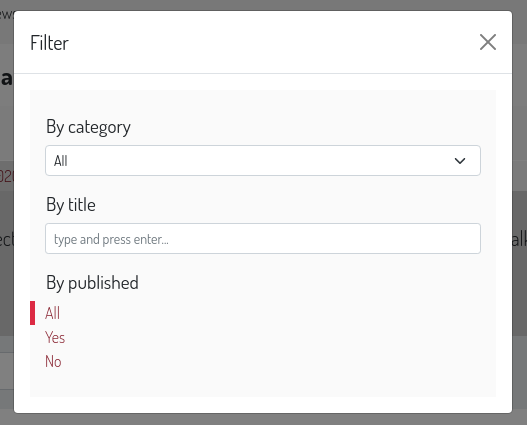
If set to True the changelist filters are opened in a centered modal above the document, useful when you set many filters. By default, its value is False and the changelist filters appears from the right side of the changelist table.
Default: False
Changelist filters always open
If set to True the changelist filters are opened by default. By default, its value is False and the changelist filters can be expanded clicking a toggler button. This option is considered only if CHANGELIST_FILTERS_IN_MODAL is False
Default: False
Changelist filters form
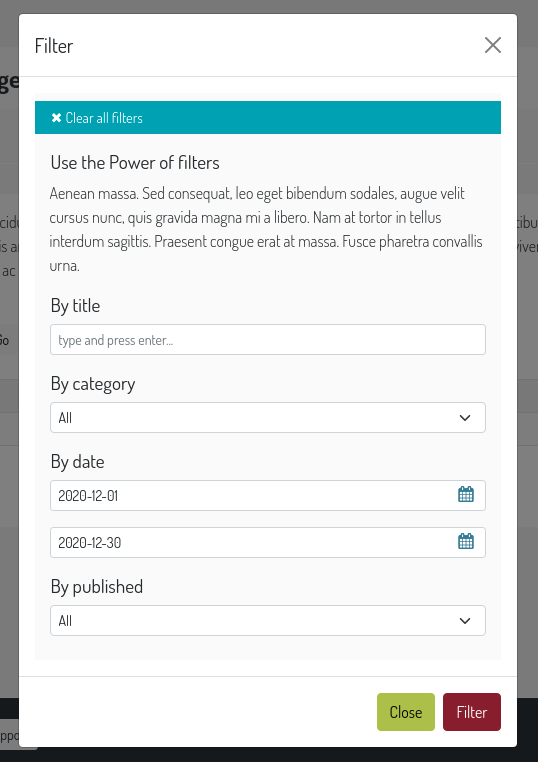
If set to True the changelist filters are treated as in a form, you can set many of them at once and then press a filter button in order to actually perform the filtering. With such option all standard filters are displayed as dropdowns.
Default: False
Changeform fixed submit row
If set to True the submit row in the changeform page is fixed at the bottom of the page on large screens.
Default: True
Collapsable user area
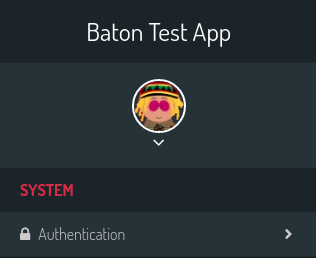
If set to True the sidebar user area is collapsed and can be expanded to show links.
Default: False
Messages toasts
You can decide to show all or specific level admin messages in toasts. Set it to True to show all message in toasts. set it to ['warning', 'error'] to show only warning and error messages in toasts.
Default: False
Gravatar default image
The default gravatar image displayed if the user email is not associated to any gravatar image. Possible values: 404, mp, identicon, monsterid, wavatar, retro, robohash, blank (see gravatar docs [http://en.gravatar.com/site/implement/images/]).
Default: ‘retro’
Gravatar enabled
Should a gravatar image be shown for the user in the menu?
Default: True
Login splash image
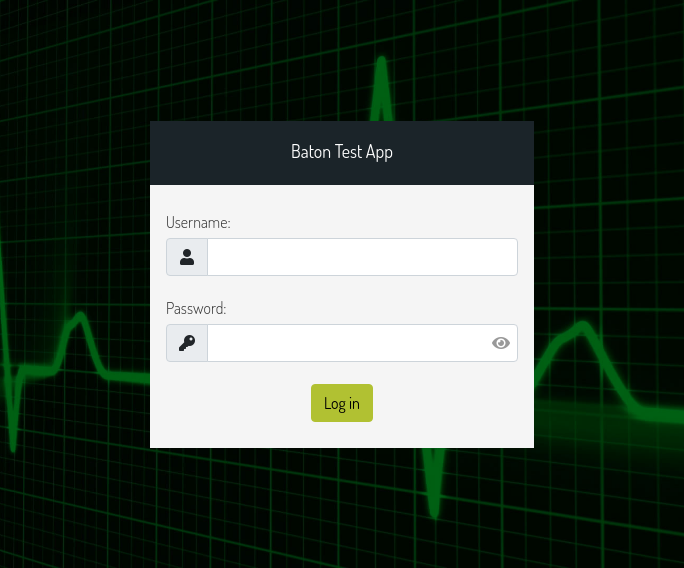
An image used as body background in the login page. The image is centered and covers the whole viewport.
Default: None
Force theme
You can force the light or dark theme, and the theme toggle disappears from the user area.
Default: None
Image preview width
The default image width in pixels of the preview shown to set the subject location of the BatonAiImageField. Defaults to 200
AI
Django Baton can provide you AI assistance in the admin interface. You can enable the translations/corrections features by setting the AI key in the configuration dictionary. You can also configure here which models to use for each functionality. Please note that different models have different prices, see [Baton site](https://www.baton.sqrt64.it).
Django Baton supports native fields (input, textarea) and ckeditor (django-ckeditor package) by default, but provides hooks you can use to add support to any other wysiwyg editor, read more in the Baton AI section.
Available models
You can configure your preferred model for each functionality, you may choose between the following::
class AIModels:
    BATON_GPT_3_5_TURBO = "gpt-3.5-turbo" # translations, summarizations and corrections
    BATON_GPT_4_TURBO = 'gpt-4-turbo' # translations, summarizations and corrections
    BATON_GPT_4O = 'gpt-4o' # translations, summarizations and corrections
    BATON_GPT_4O_MINI = 'gpt-4o-mini' # translations, summarizations, corrections and image vision
    BATON_DALL_E_3 = 'dall-e-3' # images
We currently support just the dall-e-3 model for images generation.
You can set the models used with a simple configuration::
'AI': {
    # ...
    "VISION_MODEL": AIModels.BATON_GPT_4O_MINI,
    "IMAGES_MODEL": AIModels.BATON_DALL_E_3,
    "SUMMARIZATIONS_MODEL": AIModels.BATON_GPT_4O_MINI,
    "TRANSLATIONS_MODEL": AIModels.BATON_GPT_4O,
    # ...
},
Or you can set the path to the function which returns the models dictionary::
# config
'AI': {
    # ...
    "MODELS": "myapp.foo.bar",
    # ...
},

# myapp/foo.py
from baton.ai import AIModels
def bar():
    return {
        "VISION_MODEL": AIModels.BATON_GPT_4O_MINI,
        "IMAGES_MODEL": AIModels.BATON_DALL_E_3,
        "SUMMARIZATIONS_MODEL": AIModels.BATON_GPT_4O_MINI,
        "TRANSLATIONS_MODEL": AIModels.BATON_GPT_4O,
    }
If you don’t set any of the models, the default models (BATON_GPT_4O_MINI and BATON_DALL_E_3) will be used.
Translations
Important
Note: It may happen that the AI does not translate in the right language. Also it tries to preserve HTML but not always it works. Check the contents before submitting.
Translations are designed to work with the [django-modeltranslation](https://github.com/deschler/django-modeltranslation) package.
If enabled, it will add a Translate button in every change form page. This button will trigger a request to the baton main site which will return all the translations needed in the page.
Baton will then fill in the fields with the translations.
Important
Important! Translate many long texts at once can be slow, so be sure to increase the timeout threshold in your web server configuration! The translate request is performed to the django application which then calls the external translation service, so if you have a small timeout it may happen that the request to the external translation service goes on and you’re charged for it but the application closes the request with a 502 error!
In order to use this feature, you need to set the BATON_CLIENT_ID and BATON_CLIENT_SECRET keys in the configuration dictionary. In order to obtain these keys you must create an account at [Baton](https://baton.sqrt64.it). Please visit the site for more information and pricing:
# ...
'BATON_CLIENT_ID': 'xxxxxxxxxxxxxxxxxxxx',
'BATON_CLIENT_SECRET': 'xxxxxxxxxxxxxxxxxx',
'AI': {
    'ENABLE_TRANSLATIONS': True,
    'TRANSLATIONS_MODEL': AIModels.BATON_GPT_4O, # default AIModels.BATON_GPT_3_5_TURBO
},
# ...
Corrections
You can also enable the AI corrections feature::
# ...
'AI': {
    'ENABLE_CORRECTIONS': True,
    'CORRECTIONS_MODEL': AIModels.BATON_GPT_4O, # default AIModels.BATON_GPT_3_5_TURBO
    'CORRECTION_SELECTORS': ["textarea", "input[type=text]:not(.vDateField):not([name=username]):not([name*=subject_location])"],
},
# ...
In this case near the labels of all fields which satisfy one provided selector, and all ckeditor fields, will appear an icon to trigger the AI correction.
If the corrected text is the same as the original one, a check icon will appear near the field, otherwise a modal is open, showing
the diff between the original and the corrected text. At that point you can decide to use the corrected text just by pressing the confirm button.
The default selectors are textarea and input[type=text]:not(.vDateField):not([name=username]):not([name*=subject_location]).
There is another way to trigger the correction in cases the label is not visible: ctrl + left mouse click on the field.
Summarizations, image vision and generation
These functionalities area described in detail in the Baton AI section.
Menu
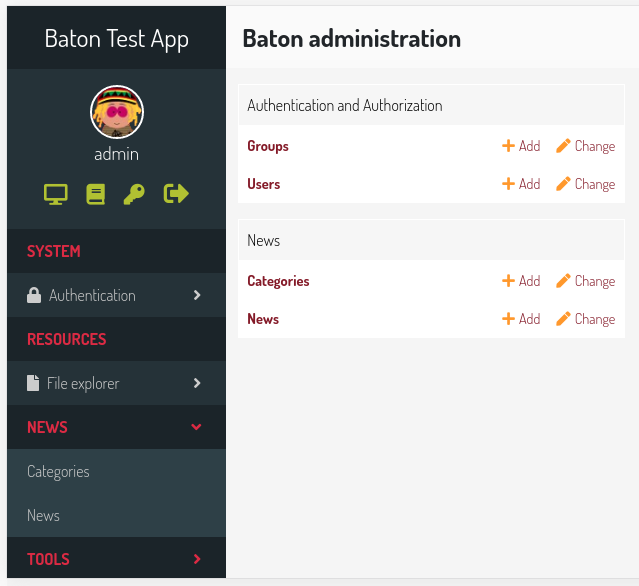
The sidebar menu is rendered through javascript.
If you don’t define a custom menu, the default menu is rendered, which includes all the apps and models registered in the admin that the user can view.
When defining a custom menu you can use 4 different kinds of voices:
title
app
model
free
Title and free voices can have children. Children follow these rules:
children children are ignored (do not place an app voice as child)
Voices with children can specify a default_open option, used to expand the submenu by default.
Title
Like the voices MAIN and CONTENTS in the above image, it represents a menu section. You should set a label and optionally an apps or perms key, used for visualization purposes.
If the title voice should act as a section title for a group of apps, you’d want to specify these apps, because if the user can’t operate over them, then the voice is not shown. At the same time you can define some perms (OR condition), something like:
{ 'type': 'title', 'label': 'main', 'perms': ('auth.add_user', ) },
or
{ 'type': 'title', 'label': 'main', 'apps': ('auth', ) },
It accepts children voices, though you can specify the default_open key.
App
In order to add an application with all its models to the menu, you need an app menu voice.
You must specify the type and name keys, optionally an icon key (you can use Material Symbols), a default_open key and a models key.
Important
If you don’t define the models key then the default app models are listed under your app, otherwise only the specified models are listed (in the order you provide).
The models key must be a tuple, where every item represents a model in the form of a dictionary with keys label and name
{
    'type': 'app',
    'name': 'auth',
    'label': 'Authentication',
    'icon': 'lock',
    'models': (
        {
            'name': 'user',
            'label': 'Users'
        },
        {
            'name': 'group',
            'label': 'Groups'
        },
    )
},
Important
App name should be lowercase.
Model
If you want to add only a link to the admin page of a single model, you can use this voice. For example, the flatpages app has only one model Flatpage, so I think it may be better to avoid a double selection.
In this case you must specify the type, name and app keys, optionally an icon key (you can use Material Symbols). An example:
{ 'type': 'model', 'label': 'Pages', 'name': 'flatpage', 'app': 'flatpages', 'icon': 'article' },
Important
Model name should be lowercase.
Free
If you want to link an external site, a documentation page, an add element page and in general every custom resource, you may use this voice.
In such case you must define an url and if you want some visibility permissions (OR clause)
{ 'type': 'free', 'label': 'Docs', 'url': 'http://www.mydocssite.com' },
or
{ 'type': 'free', 'label': 'Add page', 'url': '/admin/flatpages/flatpage/add/', 'perms': ('flatpages.add_flatpage', ) },
It accepts children voices
{ 'type': 'free', 'label': 'My parent voice', 'children': [
    { 'type': 'free', 'label': 'Docs', 'url': 'http://www.mydocssite.com' },
    { 'type': 'free', 'label': 'Photos', 'url': 'http://www.myphotossite.com' },
] },
Since free voices can have children you can specify the default_open key.
Free voices also accept a _re_ property, which specifies a regular expression used to decide whether to highlight the voice or not (the regular expression is evaluated against the document location pathname):
{
        'type': 'free',
    'label': 'Categories',
    'url': '/admin/news/category/',
    're': '^/admin/news/category/(\d*)?'
}
Search Field
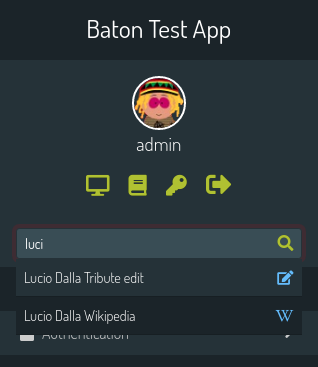
With this functionality, you can configure a sidebar input search field with autocomplete functionality that can let you surf easily and quickly to any page you desire.
'SEARCH_FIELD': {
    'label': 'Label shown as placeholder',
    'url': '/api/path/',
},
The autocomplete field will call a custom api at every keyup event. Such api receives the text param in the querystring and should return a json response including the search results in the form:
{
    length: 2,
    data: [
        { label: 'My result #1', icon: 'fa fa-edit', url: '/admin/myapp/mymodel/1/change' },
        // ...
    ]
}
You should provide the results length and the data as an array of objects which must contain the label and url keys. The icon key is optional and is treated as css class given to an i element.
Let’s see an example:
@staff_member_required
def admin_search(request):
    text = request.GET.get('text', None)
    res = []
    news = News.objects.all()
    if text:
        news = news.filter(title__icontains=text)
    for n in news:
        res.append({
            'label': str(n) + ' edit',
            'url': '/admin/news/news/%d/change' % n.id,
            'icon': 'fa fa-edit',
        })
    if text.lower() in 'Lucio Dalla Wikipedia'.lower():
        res.append({
            'label': 'Lucio Dalla Wikipedia',
            'url': 'https://www.google.com',
            'icon': 'fab fa-wikipedia-w'
        })
    return JsonResponse({
        'length': len(res),
        'data': res
    })
You can move between the results using the keyboard up and down arrows, and you can browse to the voice url pressing Enter.